Recursion
Recursion is a technique where a function calls itself to solve smaller instances of the same problem. It divides a complex task into simpler sub-tasks until it reaches a trivial case.
Key Concepts
- Base Case: The condition that stops the recursion. Without it, the function calls itself indefinitely (stack overflow).
- Recursive Case: The part where the function calls itself with modified arguments to move closer to the base case.
How Recursion Works (The Call Stack)
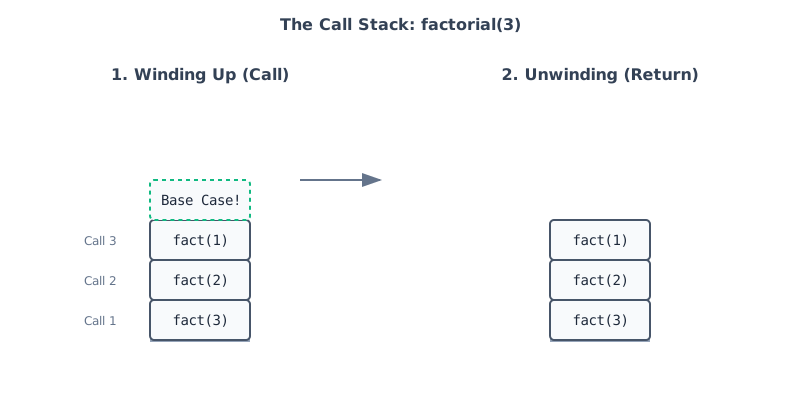
When a recursive function is called, the computer places it on the call stack.
- Each call suspends the current execution and pushes a new frame onto the stack.
- This continues until the base case is reached.
- Then, the stack "unwinds" — each function returns its result to the caller, combining them to form the final answer.
Common Patterns
- Linear Recursion: The function makes a single recursive call (e.g., factorial, linear search).
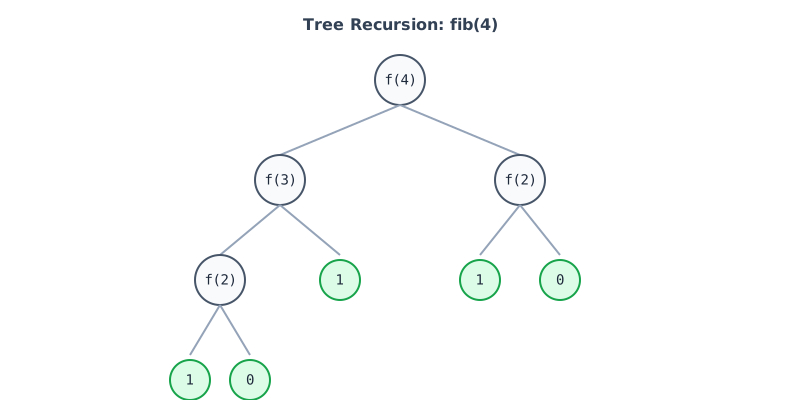
- Tree Recursion: The function makes multiple recursive calls (e.g., Fibonacci, Merge Sort), creating a branching structure.
- Tail Recursion: The recursive call is the last action in the function. Some compilers can optimize this to save memory.
Common Mistakes
Here are concrete examples of common recursion pitfalls using Python:
1. Forgotten Base Case
The function calls itself indefinitely, leading to a Stack Overflow.
def count_down(n):
    # Missing: if n < 0: return
    print(n)
    count_down(n - 1)  # Keeps going forever: 0, -1, -2...
2. Not Making Progress
The arguments passed to the recursive call do not move closer to the base case.
def factorial(n):
    if n == 1:
        return 1
    return n * factorial(n)  # Wrong! Should be factorial(n - 1)
3. Making Unnecessary Copies
Slicing arrays (arr[1:]) creates a copy in every call, turning an algorithm into .
Bad (slicing):
def sum_array(arr):
    if not arr: return 0
    return arr[0] + sum_array(arr[1:]) # Creates a new list copy each time
Good (indices):
def sum_array(arr, i=0):
    if i == len(arr): return 0
    return arr[i] + sum_array(arr, i + 1) # Zero extra space
4. Merging Incorrectly
Failing to correctly combine subproblem results (e.g., adding instead of maxing).
# Goal: Find max depth of a tree
def max_depth(node):
    if not node: return 0
    # Wrong: This adds depths instead of taking the max
    return 1 + max_depth(node.left) + max_depth(node.right)
    # Correct: return 1 + max(max_depth(node.left), max_depth(node.right))
5. Missing Return
Forgetting to return the recursive result causes the function to return None as the stack unwinds.
def factorial(n):
    if n == 1: return 1
    n * factorial(n - 1) # Bug: Missing 'return' keyword!
    # Result is None because the value is calculated but dropped.
Pros & Cons
| Pros | Cons |
|---|---|
| Simplicity: Elegant solutions for trees, graphs, and divide-and-conquer problems. | Memory Overhead: Each call consumes stack space. Deep recursion can crash the program. |
| Readability: Often mirrors the mathematical definition closely. | Performance: Function call overhead can make it slower than loops (iteration). |
Tip: Any recursive algorithm can be rewritten iteratively (using loops and an explicit stack), which is often more memory-efficient.